
You are here
Search Groupings & Results Views Customisation
The SHAREit software has multiple Search Grouping and View options available to allow for Clustered, Merged, & No Grouping search result views. These can be used in combination with the Gallery & List Results Views to customise your Staff & Patron search results as desired.
- Patron Search Grouping and View Options
- Staff Search Grouping and View Options
- Additional Search Customisation Options
- UX Admin Settings
| Important Tip: While we recommend different search grouping and view options for Patrons versus Staff, all options are available to both within UX Admin and libraries can customize their Illume site to suit the needs of their own local Patrons & Staff. Unsure which option suits best or wish to allow Patrons and/or Staff to change options on-the-fly? Your library can also activate a drop-down picklist on search results that allows users to update their results to a different grouping as desired. Contact us for assistance! |
Patron Search Grouping and View Options:
- EASY BROWSING with Clustered (Title/Author) & Gallery options: For most libraries we recommend Patrons use the Clustered (matches on just Author & Title) grouping and Gallery results views to merge all the records & formats together in one view. This allows patrons to quickly and easily browse for their desired item without scrolling through pages of results.
Please Note: This option does often require patrons to select a Format (eg. Book or DVD) to click-through to additional record results before accessing the request button.
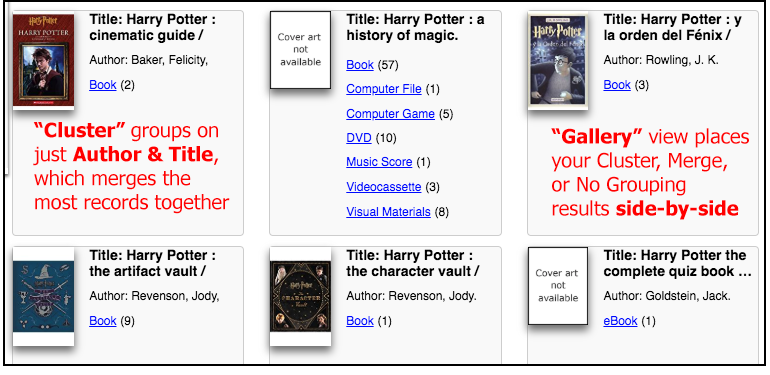
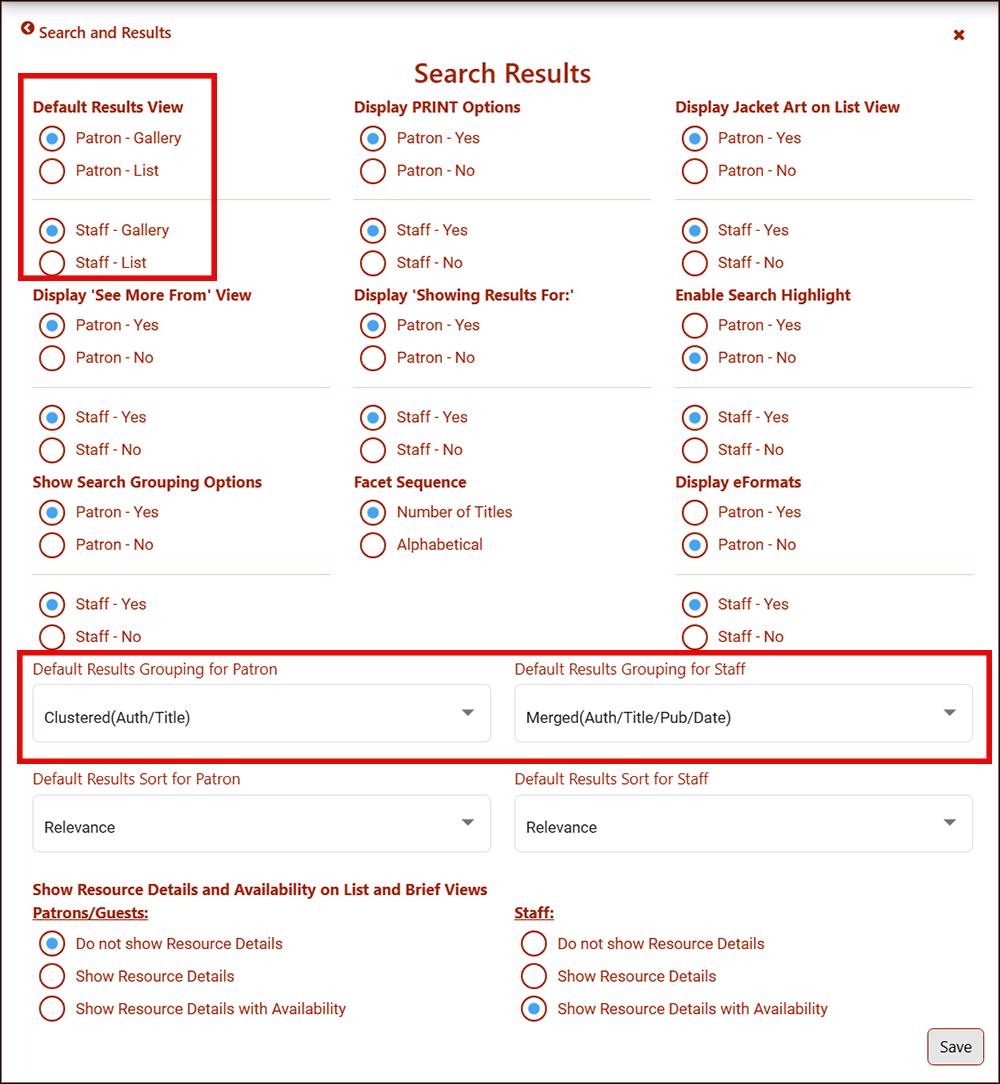
Customize search results under UX Admin and Default Results Grouping for Patron with [Clustered(Auth/Title)] from the drop-down and the Default Results View with the [Patron - Gallery] option.
- QUICK REQUESTING with Merged (Title/Author/Publisher) & Gallery options: For libraries that allow Patrons to request fewer formats (eg. Books and Large Print only), the Merged (matches on Author, Title, Publisher & Date) grouping and Gallery results may be a better option. This allows patrons to browse or filter for their desired format and often request directly from the initial search results page.
Please Note: This option can require additional scrolling or filtering of results by a patron as unavailable formats (eg. Audiobooks) may be displayed first and some results with merged records will still require patrons to click-through before accessing the request button.
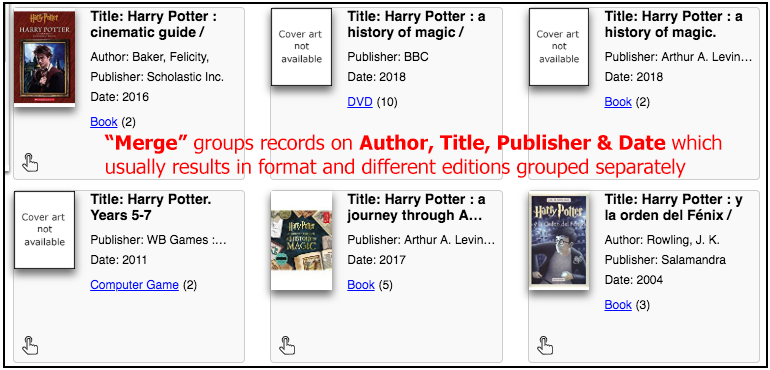
Customize search results under UX Admin and Default Results Grouping for Patron with [Merged(Auth/Title/Pub/Date)] from the drop-down and the Default Results View with the [Patron - Gallery] option.
Staff Search Grouping and View Options:
-
QUICK REQUESTING with Clustered (Title/Author) & List options: For many libraries we recommend Staff use the Clustered (matches on just Author & Title) grouping and List results views, as this directly displays all available formats together as well as the "hand icon" quick request button next to many of the format icons (eg. Book, Large Print or DVD).
Please Note: This option may require Staff to scroll for additional items, but the useful format icons only display in List view and not Gallery due to space restrictions.
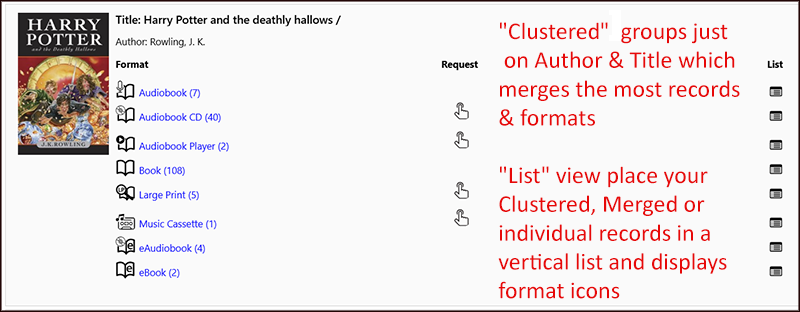
Customize search results under UX Admin and Default Results Grouping for Staff with [Clustered(Auth/Title)] from the drop-down and the Default Results View with the [Staff - List] option.
- LEGACY VIEW with No Grouping & List options: For Staff that have used SHAREit for many years, they may prefer the No Grouping (no matching or merging records) search result and List view as it most closely displays the original legacy view of older versions of SHAREit. This view allows Staff to select a desired individual record and request directly from search results as there's no additional merging of multiple records or formats.
Please Note: This view is only recommended for Staff that prefers the legacy view as it may require more scrolling and filtering or use of the Advanced Search or filters to narrow record results.
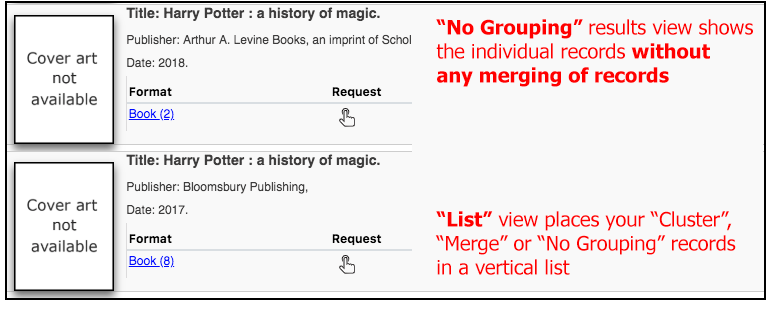
Customize search results under UX Admin and Default Results Grouping for Staff with [No Grouping] from the drop-down and the Default Results View with the [Staff - List] option.
Additional Search Customisation Options
Many additional options are also available in UX Admin Settings to customize the appearance for both Patrons and Staff. Please contact us if you'd like assistance with any of these options.
- Dropdown to Update Groupings and Views (recommended): Libraries can also activate a drop-down picklist on search results that allows your Patrons and/or Staff to update their results to a different grouping.
Customize search results under UX Admin and "Show Search Grouping Options" and select "Patron - Yes" and/or "Staff - Yes" to activate the dropdowns. More information including screenshot under UX Admin Settings.

- Highlight Key Search Terms: Libraries can also activate a text overlay that highlights the entered text in search results. This can be helpful as SHAREit searches all MARC fields when retrieving search results and it can sometimes be hard to tell why a particular record was displayed.
Please Note: With common search terms this can be very cluttered and distracting for Patrons and may only be recommended for Staff views.

Customize search results under UX Admin and "Enable Search Highlight" and select "Patron - No" and/or "Staff - Yes" to only activate for logged in Staff views.
- Live Availability Displays: There is the option to display live availability Copy or Holdings information and the potential number of copies currently available within SHAREit search results and Brief display pages. As Illume search results contain a mixture of non-live UDB holdings and live Z39.50 target copy information, this number is usually not accurate and may be confusing to Patrons. The live availability of a Copy is also often irrelevant as the request may reach Lenders after the item is available again.
The Holdings (if available) information on all Brief display pages allows Staff to quickly see which record has the most holdings attached. For example, in the screenshot below the number of Holdings/Libraries attached to the Book "Half broke horses : a true-life novel" displays as (73) on the Initial merged or clustered records results page. And on the subsequent non-merged Brief display page for each record with (58) or (15) holdings (previously did not display). This allows Staff to easily use the "Clustered" or "Merged" views rather than having to use the "No Grouping" and "List" option to always see all available holdings information
We recommend this is de-activated for Patrons as they should not be using this availability option to make decisions on creating a request. But we do recommend it is displayed to Staff as they're able to assess the usefulness of the information displayed when making decisions (eg. if only 1 lender/copy is available).

Customize search results under UX Admin and "Show Resource Details and Availability on List and Brief Views". Select the [Do not show Resource Details] under "Patrons/Guests" and the [Show Resource Details with Availability] option under "Staff" to only activate the availability info for logged in Staff views.
- Hide eFormat for Z39.50 records: For libraries that allow their Patrons to search live Z39.50 targets (eg. University of British Columbia), they may want to hide eFormat records from display if they cannot be requested.
Please Note: This is only recommended for Public libraries, as many eJournals that are used for Post-secondary requests of Copy articles are hidden with this setting. This applies to the eAudioBook, eBook, eJournal, eMap, eMusic, eNewspaper, eSerial, and eVideo formats on live targets only.
Customize search results under UX Admin and "Display eFormats" and select "Patron - Yes" and/or "Staff - No".
UX Admin Settings
While logged in as an Administrator, libraries can customize search results under UX Admin > Settings > Search and Results > Search Results.
This section in SHAREit has many settings densely packed together and can be confusing. Please contact us if you'd like our assistance discussing your options and updating your settings for you!
Have any questions/concerns or would like help updating your UX Admin Search Results setttings? Contact us for assistance!