
You are here
Request Manager Guide
Included in our May 27th, 2026 software update is a re-design of the ILL Admin > Request Manager and it's configuration options. Library administrators will be able to customize the Request Manager view, including custom section labels and re-organization of statuses within sections.
Staff can also now set the Request Manager as their default opening page! To change the default for your account, go to Your Account > Your Preferences > under Default Opening Page select "Request Manager" and save.
Request Manager Navigation:
The sections previously called "Items awaiting trading partner response" have now been renamed "Awaiting Lender Action" & "Awaiting Borrower Action"and have the option to display "All" requests, just the "Active" requests, or requests with just "Unreviewed Notes".
- Once staff select a tab (eg. "Active) it will remain 'sticky' or persist between sessions for that account. For ILL Staff sharing an account, we recommend contacting your local Administrator or Illume Support for assistance creating individual accounts to avoid staff confusion.
- "All" Tab: This is the default tab and will show all categories/statuses, even if there's 0 active requests. This display most closely resembles the current Request Manager.
- "Active" Tab: This tab view displays categories/statuses that have 1 or more active requests and helps to streamline the Request Manager view for Staff at busy libraries.
- "Unreviewed Notes" Tab: This tab view will only displays categories/statuses that have requests with an unread or "Unreviewed" note. Please check-out our new FAQ here for more information on the new Notes visibility options: https://illumebc.ca/faq-request-notes
- Tip: Click the "Borrower" or "Lender" top-level headers to quickly navigate to the ILL Admin > Borrower Requests or Lender Requests browse options!
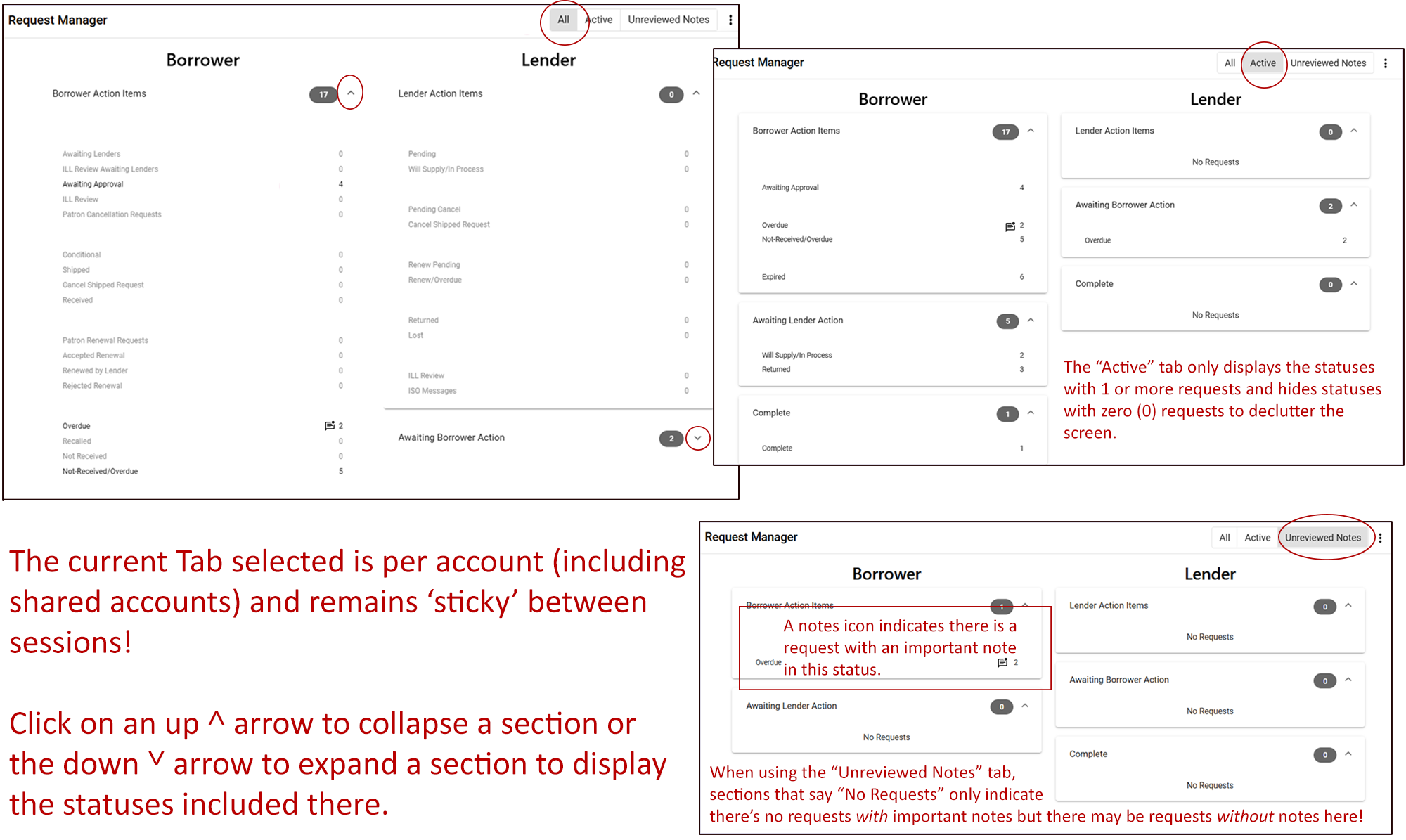
- Any status that has at least one request with an “Unreviewed Note” will display a Notes icon next to that category, to alert staff there are unread notes. Important Note: When using the "Unreviewed Notes" tab, if a section or group says there are "No Requests" this only indicates there's no requests with unread notes -- but there may be requests without notes or read notes in these statuses!
- The main sections (Borrower Action Items, Awaiting Lender Action, Complete, Lender Action Items, Awaiting Borrower Action, and Complete) can be individually collapsed or expanded using the up and down arrows.
- The Request Manager automatically refreshes every 30 seconds to display any updated statuses!
Request Manager Configuration:
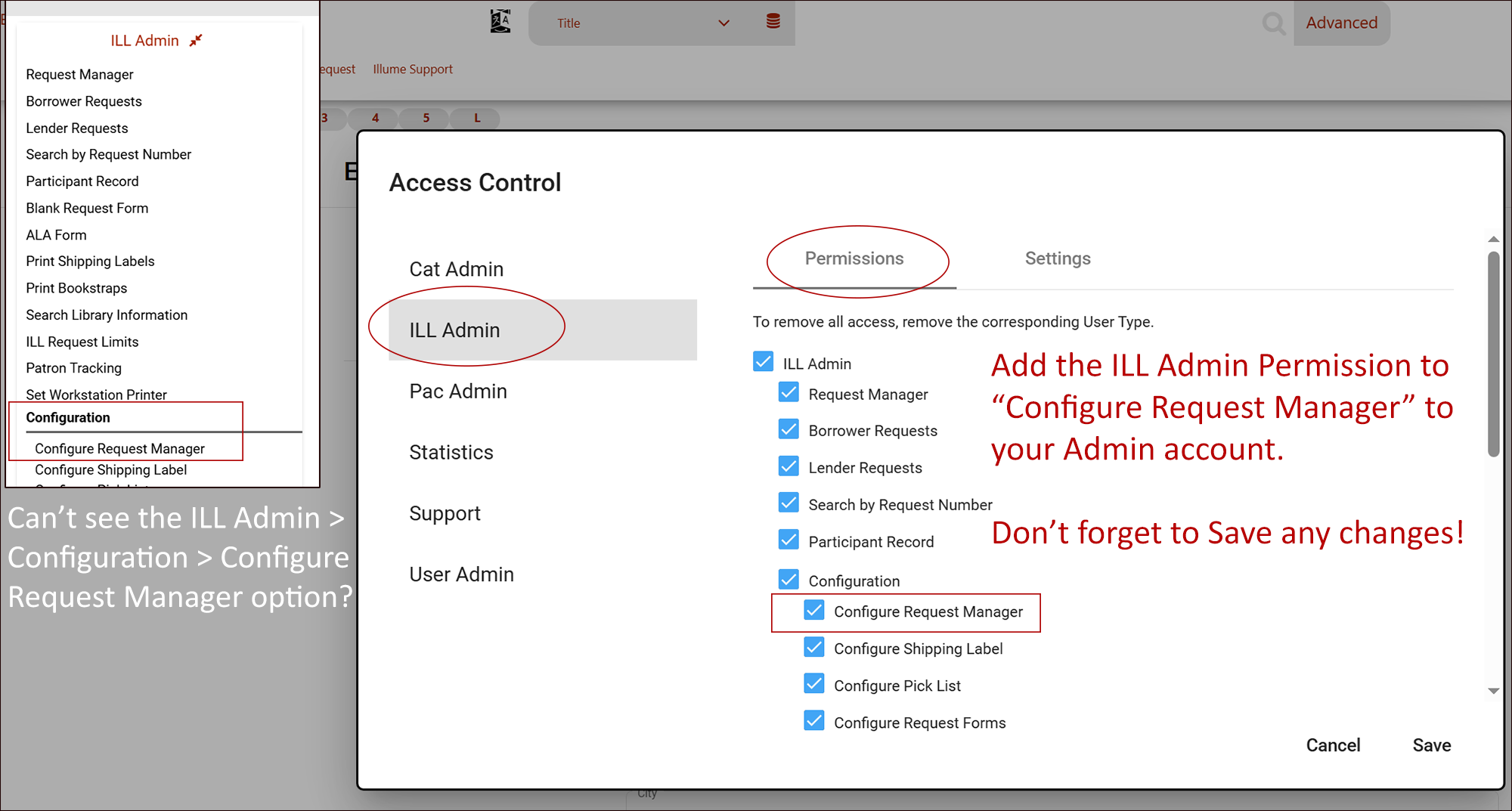
Library administrators can now customize the Request Manager view, including custom section labels and re-organization of statuses within sections! Are you missing the permission to update your Request Manager with your Admin account? Check-out our instructions below on how to add it or contact us with your account name for assistance.
While logged in as an Administrator, admins can go to Staff Dashboard > ILL Admin > Configuration > Request Manager Configuration to update:
- Left-click a Status (eg. Awaiting Approval) or Group to drag & drop it elsewhere. Please note that statuses cannot be moved to invalid sections (eg. a status waiting for lender action can't be moved to borrower action).
- Custom group Headings can be added, rather than just a blank separator.
- Groups within sections can be given an overall Heading, for example in the "Borrower Action Items" section Administrators can add a section called "Review Needed" or "New Requests" with "Awaiting Approval" and "ILL Review" requests. Or in the "Lender Action Items" add a group called "Renewals" with the statuses "Renew Pending" and "Renew/Overdue".
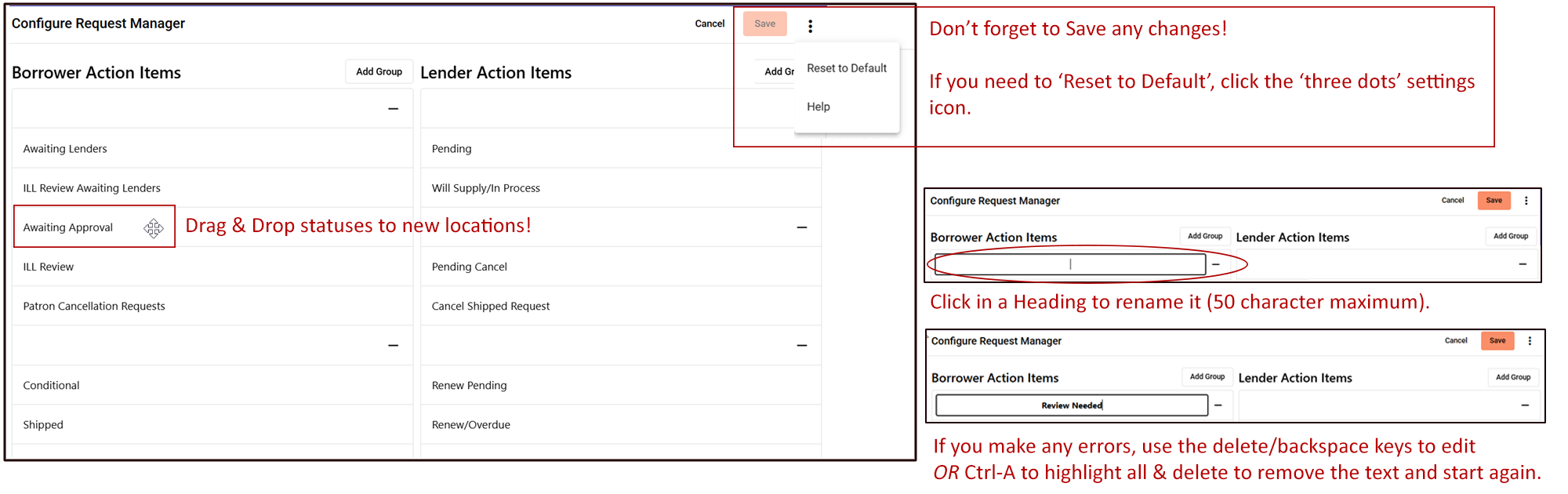
- Blank rows between status groups in each section can be removed or additional blank rows can be added.
- Click the minus - sign to delete a heading row or click "Add Group" to add a new group heading row.
-
Don't forget to click "Save" frequently to update your changes or "Cancel" to discard the most recent updates! If you would like to revert all changes, click the 'three dots' settings icon and use "Reset to Default".
-
Administrators can also view an hour long discussion and preview of Request Manager configuration options from the vendor Auto-Graphics located within your Staff Dashboard > Support > SHAREit > SHAREING ABOUT SHAREIT Q&A > #49 - New Request Manager videos.
-
After the software update, some Library SuperUser accounts may be missing the "Configure Request Manager" permission to customize the new Request Manager. Check-out the instructions below and our User Admin create/edit guide here for further instructions or contact us for assistance.
Please contact us know if you'd like any assistance with your new Request Manager or if you'd like to suggest further software enhancements or improvements!